RPM-PRO
Every critical part on the car has a life — measured in miles, hours, or heat cycles — and the one you lose track of is the one that fails at speed and turns a strong run into a DNF.
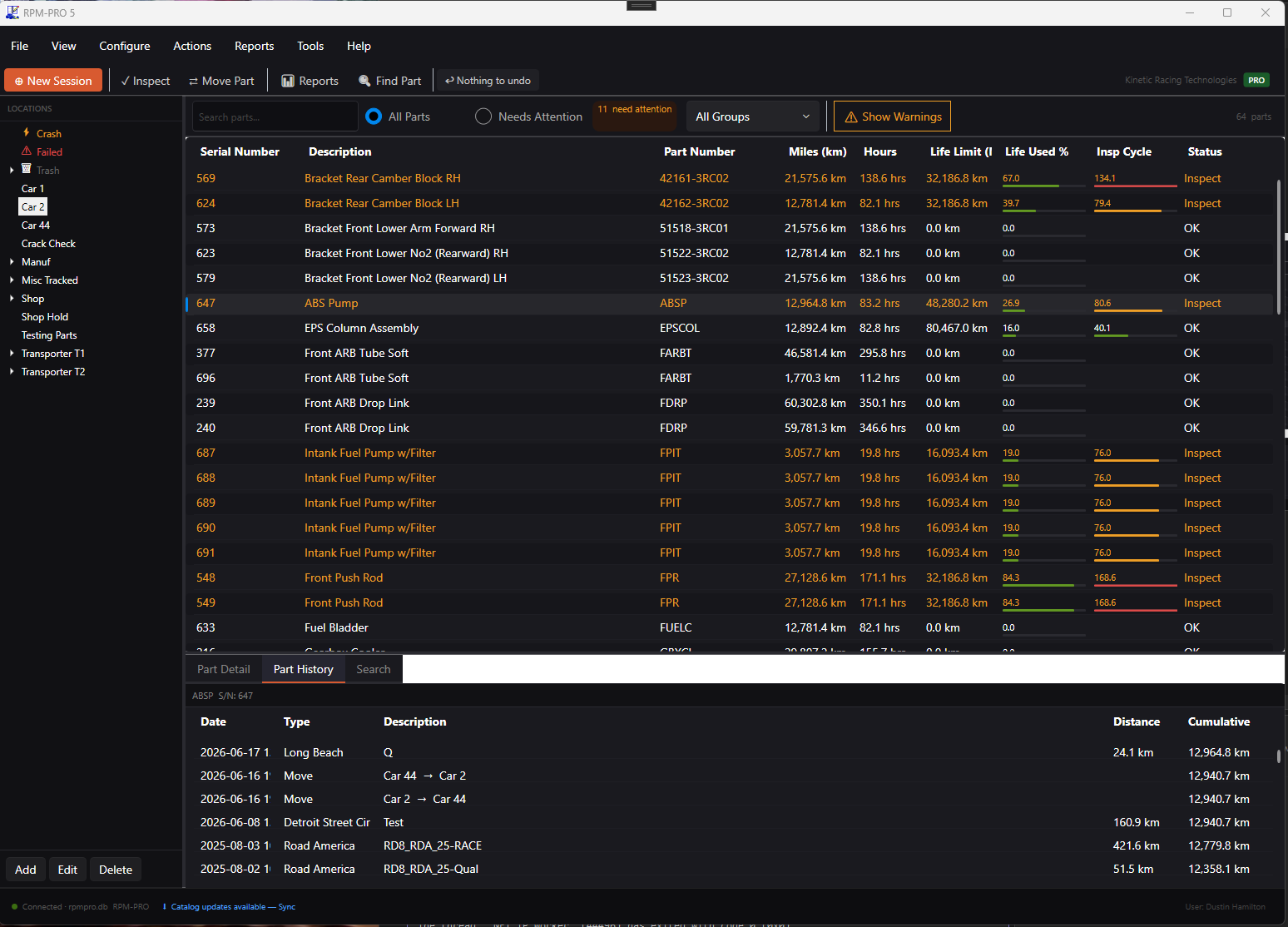
RPM-PRO v5 tracks the usage on every component as you run, so you always know what's fresh, what's due, and what needs attention before the car rolls out. It isn't a stockroom system — it's built around part life and usage, the things that actually end race weekends.
What RPM-PRO does for you
- Track usage, not paperwork. Log miles, hours, and cycles against each part as you run. RPM-PRO keeps the running life total on every component — no spreadsheets, no memory, no guessing.
- Stay ahead of what's due. RPM-PRO flags every part approaching or past its limit, so a worn component comes off in the shop instead of failing on track.
- Every part's history, every failure. Full usage and service history on each component, plus failure records you can learn from — so a known problem doesn't repeat.
Set a limit on any part
Usage or condition, not stock counts. RPM-PRO supports multiple trigger types so your maintenance intervals match how you actually run your program.
- Miles / kilometers
- Maximum RPM
- Cumulative engine hours
- Maximum water temperature
- Post-race inspection
- Maximum oil temperature
- Annual service interval
- Minimum oil pressure
- Rebuild interval
- Calendar days
Who it's for
Professional and semi-professional race teams running any form of motorsport where component life matters. If you have a parts budget, a maintenance schedule, and more than one person making decisions about what goes on the car — RPM-PRO is built for your operation.
How it works
RPM-PRO tracks individual serialized components through their entire life on your car. Every time a part runs — whether that's measured in miles, laps, hours, or event cycles — RPM-PRO logs it. It knows where each part is, what it's accumulated, and whether it's approaching a service or replacement threshold.
When a part hits a limit, you'll know before it becomes a problem on track.
Core features
Part life tracking
Track individual components by serial number across their entire service life. Multiple trigger types supported — time, distance, laps, events, or combinations.
Session-based usage logging
Log usage by session, run, or event. Each entry builds a complete history.
Inspection & replacement scheduling
Define inspection intervals for every component type. Color-coded warnings give clear status at a glance across your entire inventory.
Part history & failure analysis
Every part carries a complete life record — usage entries, inspections, mileage corrections, and failure details. When something does fail, you have the full history.
Failure report export
Generate a complete failure report package — PDF summary, structured data file, and any attached photos — in a single step. Useful for warranty claims and manufacturer communication.
Location tracking
Know where every part is at all times — on the car, in the spares kit, on the shelf, at a vendor, or retired.
Manufacturer-supplied limits
When your parts suppliers use RPM-Enterprise, their recommended inspection and replacement limits push directly to your RPM-PRO installation. Failure reports flow back automatically.